c0mpiler/claude-code-proxy
Use Claude Code with your choice of models, guided login, and persistent local profiles.
300
c0mpiler/claude-code-proxy repository overview
claude-code-proxy
One proxy. Your choice of models.
Use Claude Code with Cursor, Codex, Kimi, Grok, or OpenCode Go. Sign in through the local setup page, choose a model for each role, and keep your projects, tools, skills, and conversation in Claude Code.
Start with Docker
You need a running Docker engine, Claude Code installed on your host, and a supported provider account with model access and available quota. The public images need no registry login, source checkout, Rust toolchain, or provider CLI installation.
docker pull docker.io/c0mpiler/claude-code-proxy:0.2.0
docker run -d --name claude-code-proxy \
  --init --restart unless-stopped \
  -p 127.0.0.1:18765:18765 \
  --mount type=volume,source=claude-code-proxy-profile,target=/var/lib/claude-code-proxy \
  --read-only --tmpfs /tmp:size=64m,mode=1777 \
  --cap-drop ALL --security-opt no-new-privileges:true \
  docker.io/c0mpiler/claude-code-proxy:0.2.0
docker inspect --format '{{.State.Health.Status}}' claude-code-proxy
Once the status is healthy, print your private setup link:
docker exec claude-code-proxy claude-code-proxy ui --print-url
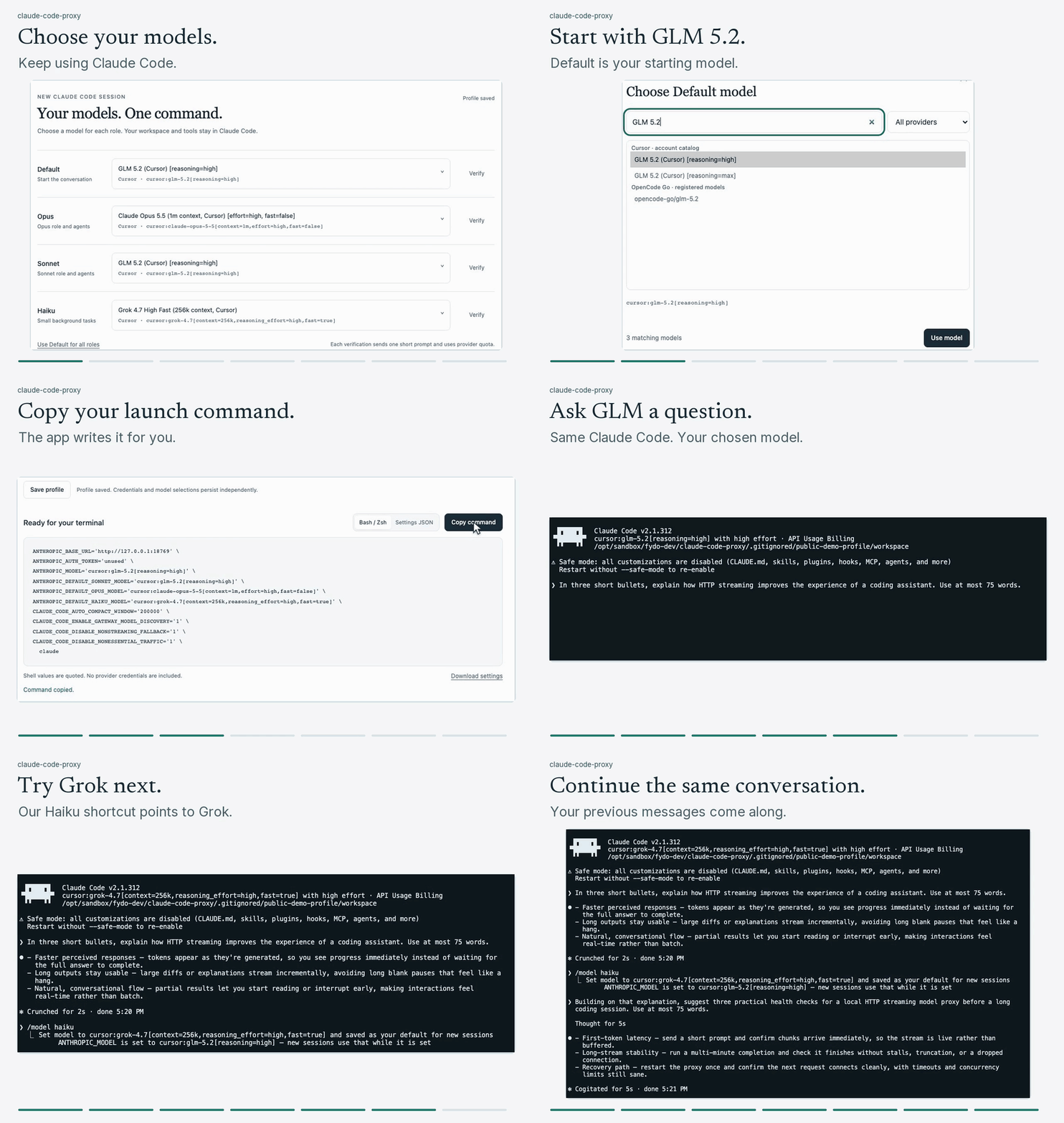
Open that link in your browser. Connect a provider, choose the Default, Opus, Sonnet, and Haiku equivalents, and use Verify to check that your chosen models can respond. Save the profile and copy the generated command into a host terminal to start Claude Code.
Choose a registry and architecture
- Docker Hub:
docker.io/c0mpiler/claude-code-proxy:0.2.0 - Quay.io:
quay.io/c0mpiler/claude-code-proxy:0.2.0
Both public images support Linux ARM64 and Linux AMD64. Docker selects the architecture for your engine; Apple Silicon uses Linux ARM64 containers inside its Docker VM. Use either image in the command above.
Versioned tags support controlled updates. latest moves after the release's registry and lifecycle checks pass. Pin a manifest digest when you need an immutable deployment.
Keep your profile when updating
Provider logins, refreshed credentials, model choices, and the setup access key stay in the claude-code-proxy-profile volume. Recreate the container with the same volume when updating. Removing that volume removes the saved profile.
The example publishes the proxy only on host loopback. It is intended for one user on their own machine. Provider authorization opens in your host browser; your Claude Code session and workspace remain on the host.
Documentation
- Docker requirements, alternate ports, Compose, and updates
- Guided provider login and four-role model setup
- Configure Claude Code
- Troubleshooting
License: MIT. The license is included in the image at /usr/share/doc/claude-code-proxy/LICENSE.
Tag summary
Content type
Image
Digest
sha256:6c5e4e64f…
Size
42 MB
Last updated
4 days ago
docker pull c0mpiler/claude-code-proxy